Rebuilding Four Small Projects
Over the past few weeks I have reworked four of my open-source projects: DonumAI, a personalised AI teacher, MittentisAi, a site for AI-written short fiction, Learn with DonumAI, an automated educational podcast, and EZTime, a local solar time clock. Each one lives in its own repository, and each began as a quick experiment. The rewrite had a single aim: make the architecture of each project simple enough to explain on one diagram. This post does exactly that, project by project, and records what changed from the earlier versions.
Shared foundations
Four projects share a handful of design decisions, and most of the changes below follow from them.
The AI layer. DonumAI, MittentisAi and the podcast now use Google's current Interactions API through the google-genai SDK. Every text call is interactions.create(model, input, store=False), so the call does not ask Google to retain the interaction. Where the output must be machine-readable, the call adds a response_format carrying a JSON schema, and the code parses the result and rejects anything malformed. Images use the same call with an image response format and a 16:9 aspect ratio. The shared retry policy makes up to three attempts, waits 30 seconds multiplied by the attempt number on a rate-limit error, and waits two seconds on anything else. Failures return an empty result, and the caller decides what to do with it. That keeps error handling out of the generation code.
Configuration and state. Secrets and settings come from environment variables, loaded from a local .env file at start-up. The Gemini client is created lazily, so a site still starts and serves its stored pages when a key is missing. State lives in small JSON files written atomically: the code writes to a temporary file in the same folder and then swaps it into place with os.replace, so a crash mid-write cannot leave a half-written file. A lock serialises writes inside the process.
Jobs. Anything slow, such as generating stories or an episode, runs as a background job behind its own non-blocking lock. The HTTP endpoint that starts a job returns at once: 202 when the job starts, 409 if one is already running and 403 for a missing or wrong key. Keys are compared in constant time. Every job can also be run from the command line, so a host's scheduled-task feature works without any web endpoint.
Output safety and headers. Anything that came from a model passes through Markdown conversion and then an allow-list sanitiser before it reaches a template. Every response carries a Content-Security-Policy that restricts assets to the same origin, plus nosniff and a no-referrer policy. Pages that depend on the visitor are marked no-store. None of the sites load third-party fonts, icon libraries or scripts, which keeps the policy short and the privacy and terms pages easy to keep accurate. Those pages were rewritten to match the architecture described here.
DonumAI
DonumAI is a stateless request-response application with no database. The diagram below shows the browser, the Flask app and Google's API.
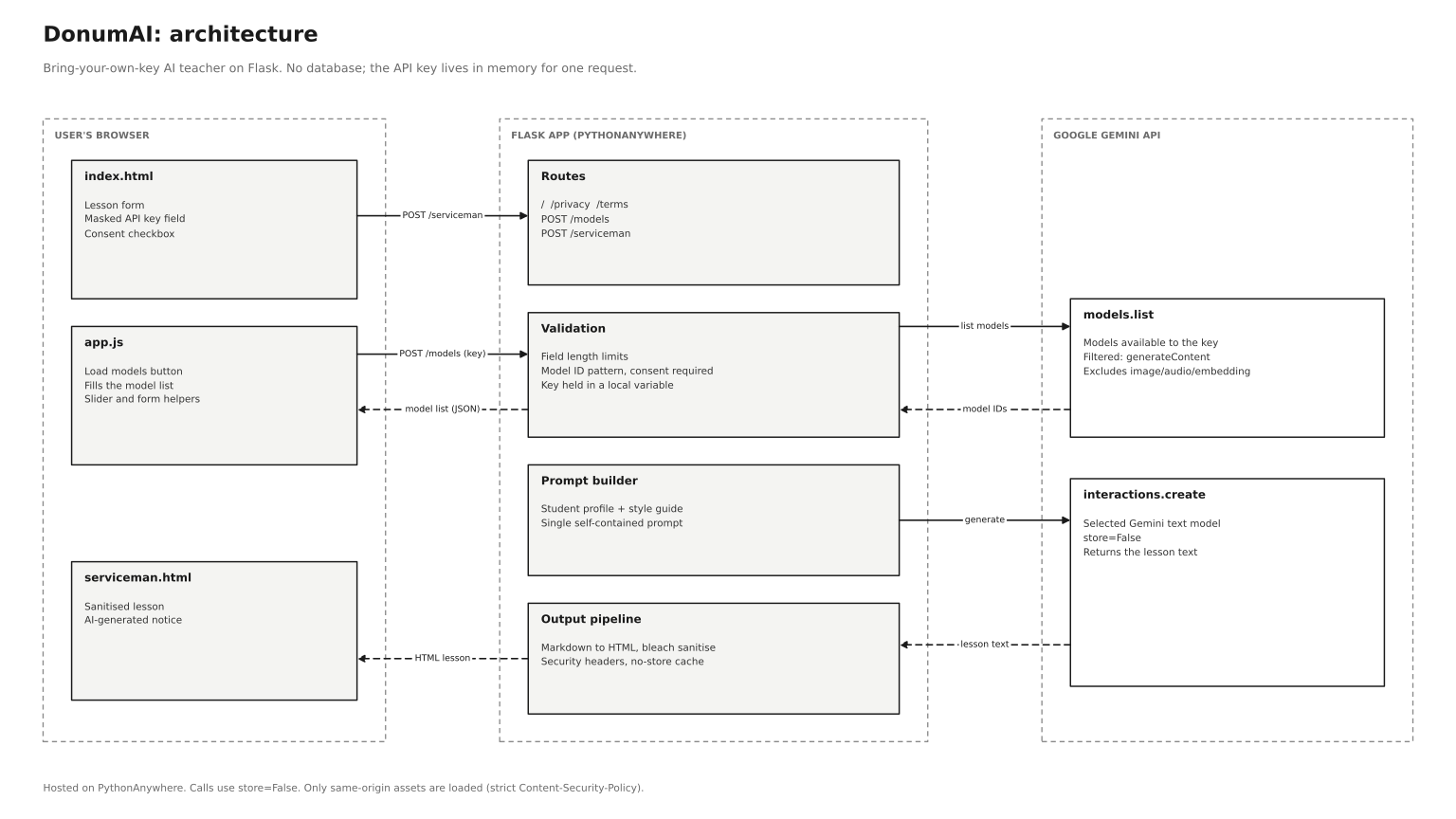
The lesson flow is a single request. The browser posts the form to /serviceman. The server trims and caps every field, checks that the model ID matches a gemini- pattern, requires the consent flag, and builds one self-contained prompt from the student's profile and a style guide kept as a constant. It then creates a Gemini client with the user's own key and makes the call. The key exists only as a local variable and is cleared in a finally block. The response is converted from Markdown to HTML, sanitised with an allow-list, given an AI-generated notice and rendered. If anything goes wrong, the user sees a generic message with the exception class, never the raw exception text.
A second route, /models, replaces the hardcoded dropdown. A button in the page sends the key to the server, which calls models.list, keeps only models that support content generation and whose IDs start with gemini-, drops embedding, image, audio and live variants, and returns the newest first as JSON. The browser fills the dropdown with DOM textContent, never innerHTML for model data.
| Earlier version | Current version |
|---|---|
Process-wide genai.configure(api_key=...) |
A client per request, so one request's key cannot affect another |
| Hardcoded list of models | Live list from the user's own key |
Key and form data in print statements |
No logging of form fields or keys |
| Raw model HTML trusted | Sanitised before display |
| Debug mode on, bound to all interfaces | Debug off, localhost by default |
| Unused routes and absolute file paths | Removed |
| External fonts, icons and syntax-highlighting scripts | Same-origin assets only |
MittentisAi
MittentisAi publishes an edition of nine stories, one per genre, and serves them as plain pages.

The data model is a single file, data/stories.json, mapping nine slots to a title, sanitised HTML and a date. Each slot is tied to a genre, and slot 5 is the featured story. Because each story has its own date, a partly successful batch is always described truthfully.
A scheduler calls /trigger/mittentis/ or the command-line entry point. The job loads the existing stories to build a list of titles to avoid, then writes one story per genre. Each request returns a JSON object with a title and a story, so one call replaces the earlier two. A story under 80 words is treated as a failure. When a story fails, the job stops but keeps everything generated so far, merges it into the existing data and saves once. The image job then runs if the featured slot was updated today. It generates a 16:9 illustration from the featured headline, caps it at 1280 pixels and swaps it into place atomically. If generation fails, the previous image stays.
On the read side, the home page computes excerpts from the sanitised HTML and cuts them at word boundaries. Article pages add previous and next links across the slots that exist. An empty edition shows a plain "no stories yet" message.
| Earlier version | Current version |
|---|---|
| Stories held in memory, lost on restart | JSON file with atomic writes |
| Two model calls per story | One call returning JSON |
| A failed batch overwrote every slot with placeholders | Successful stories kept, per-story dates |
| Featured image squashed to 512 by 512 | Aspect ratio preserved, 16:9 |
| Open trigger and upload endpoints | Keyed endpoints, upload disabled by default |
| Slow work inside the HTTP request | Background job with a lock |
| Secrets in the source file | Environment file |
Learn with DonumAI
The podcast is a six-step pipeline with one trigger and no visitor-facing pages.

After the keyed trigger starts the job, the pipeline picks a topic, writes a script, converts it to speech, writes episode metadata and publishes. Topic selection is the heart of the redesign. The history lives in data/topics.json. Each candidate topic is normalised by lowercasing it and stripping punctuation, then compared with the history by exact match and by word overlap, rejecting anything above 80 percent similarity. The most recent 60 topics are also passed to the model as topics to avoid, and the job tries up to five times. A topic is added to the history only once it is accepted.
The script and the metadata come from Gemini, the first as plain text and the second as JSON with a title and a description. Audio comes from gTTS and is saved to data/episode.mp3. Publishing follows the Podbean flow: obtain an OAuth token, request an upload authorisation, upload the file to the pre-signed address, then create the episode. Every request has a timeout, every response is checked, and a failed episode creation is logged with the status code. A PODBEAN_PUBLISH setting turns publishing off for a dry run.
| Earlier version | Current version |
|---|---|
| History check compared lowercase text with a capitalised prefix, so it never matched | Normalised, structured history with similarity check |
| Audio written to a relative path | Absolute path in a data folder |
| Network calls with no timeouts | Timeouts and checked responses |
| Publishing failures silent | Logged with status codes |
| A "production mode" flag in the code | Environment setting |
| Long work inside the HTTP request | Background job with a lock |
EZTime
EZTime works out solar time from a longitude. The earlier version did the calculation on the server and re-created the clock in the browser, and this version separates the two cleanly.

On each page view, the server reads the visitor's address from the proxy header, falling back to the connection address, and validates it with Python's ipaddress module. A small in-memory cache holds lookup results for an hour and failed lookups for five minutes. A cache miss calls the geolocation service with a four-second timeout and accepts only a successful response with a numeric longitude. The server then computes the offset as round(longitude x 240) seconds. Using whole seconds avoids the floating-point truncation in the earlier minutes-based maths.
The page carries that offset in a data attribute, along with an initial time so nothing is blank before the script runs. In the browser, a small script computes Date.now() + offset and formats it with UTC getters, so the visitor's own time zone cannot interfere. It redraws on each second boundary instead of using a drifting setInterval. The calculator is entirely client-side, and the device-location button uses the browser's own permission prompt.
| Earlier version | Current version |
|---|---|
| Missing proxy header caused a server error | Validated address with a fallback |
| No timeout or failure handling on lookups | Timeout, status checks and a clear fallback page |
| Three near-identical render branches | One calculation, one template context |
| A lookup on every page view | Short-lived in-memory cache |
Clock rebuilt with setHours in the visitor's time zone |
Offset arithmetic in UTC |
| A duplicate terms page and a separate blog | Redirects to the current pages |
| Third-party analytics | None |
The projects are not finished. The next steps are automated tests for the generation and storage paths, better logging for scheduled jobs, and an archive of past stories on MittentisAi instead of replacing the same nine slots each edition. But each project is now small enough to hold in your head, and each has a diagram that matches the code.
All four are open source, and the diagrams above reflect the repositories. Feedback, issues and pull requests are welcome.